

A comfortable home office needs more than a desk, chair and computer. It also needs reliable power, suitable lighting, safe wiring and enough electrical capacity to support the equipment you use every day.
Whether you work from a spare bedroom, a converted garage or a dedicated study, good electrical planning can make your workspace safer and easier to use. It can also help prevent overloaded power boards, tangled extension leads, poor lighting and interruptions during important meetings.
For homeowners planning a new workspace or upgrading an existing one, consulting a home office electrician Melton residents can rely on is a practical way to identify electrical needs before buying equipment or moving furniture.
Techsmart Electrical understands the importance of planning electrical installations around the way people use their homes. A well-planned home office should support computers, monitors, printers, networking equipment and task lighting without creating unnecessary electrical risks.
This guide explains how to plan power outlets, lighting, dedicated circuits and wiring for a home office in Melton, Victoria. It also covers common mistakes, practical safety checks and situations where a licensed electrician should assess the installation.
Home offices have become more equipment-intensive. A typical workstation may include a laptop or desktop computer, two monitors, a printer, a router, a phone charger, a desk lamp and other accessories.
Individually, these devices may use relatively little power. However, connecting several appliances to one outlet or an overloaded power board can create avoidable risks.
Poor planning can also lead to everyday frustrations, including:
These problems are easier to address before a room is fitted out. A Melton electrician can assess the existing installation, discuss your equipment requirements and identify whether additional outlets, lighting changes or circuit upgrades may be appropriate.
The goal is not to install as much electrical equipment as possible. It is to create a workspace that meets your actual needs while maintaining electrical safety and complying with applicable Victorian requirements.
Before choosing outlet locations or lighting fixtures, make a list of the equipment you expect to use.
Start with the essentials and then consider any equipment you may add over the next few years.
| Equipment | Electrical planning consideration |
| Laptop or desktop computer | Reliable power and accessible outlets |
| Monitors and docking station | Enough connections without excessive adapters |
| Printer or scanner | Suitable outlet placement and manufacturer requirements |
| Router and networking equipment | Convenient location and ventilation |
| Desk lamp | Adjustable lighting without trailing leads |
| Speakers and chargers | Additional outlet capacity |
| UPS or backup equipment | Correct rating, ventilation and manufacturer instructions |
Measure the room and decide where the desk, monitor, storage units and other furniture will sit. Then identify where power outlets and lighting controls would be most useful.
For example, someone working from a small bedroom may need a compact arrangement with outlets beside a desk. A person running a desktop workstation, printer and multiple monitors may need more connections and a closer assessment of the existing circuit capacity.
Planning around the actual furniture layout can reduce the need for extension leads and make the workspace easier to maintain.
Think about whether you might add a larger monitor, a second workstation, a high-performance computer or other equipment later.
Allowing for realistic future needs can prevent repeated electrical changes. However, additional outlets alone do not increase the amount of power a circuit can safely supply. The existing wiring, circuit protection and connected loads must also be considered.
Power outlets are one of the most important parts of a functional home office. Too few outlets often lead to multiple adapters and power boards, while poorly positioned outlets can leave cables stretched across the room.
There is no single outlet count that suits every home office. The right number depends on the equipment, desk arrangement, room layout and existing electrical installation.
Consider placing outlets where they can be reached without moving heavy furniture. Depending on the layout, useful locations may include:
Avoid placing outlets where furniture will permanently block access or where cables could become trapped behind drawers.
For a shared workspace, think about whether two people might use the room at the same time. Separate work areas may need their own conveniently positioned outlets.
A compliant, undamaged power board can be useful for connecting several low-power devices, provided it is used within its rated capacity and according to the manufacturer’s instructions.
However, a power board is not a substitute for assessing the electrical installation. Avoid connecting one power board to another, exceeding the rated load or using equipment with damaged plugs or cables.
Keep power boards away from liquids, excessive heat and locations where they can be crushed under furniture. Do not cover them with rugs or place them where dust and poor ventilation could create problems.
If you regularly run out of connections, ask a licensed electrician whether additional fixed outlets would be a better long-term solution.
Good workstation lighting helps you read documents, see your keyboard and work comfortably throughout the day. It should provide enough illumination without creating distracting reflections on your monitor.
A room can look bright while still having poor lighting at the desk. The position, direction and quality of light matter just as much as brightness.
Where possible, position your desk to make useful use of daylight without placing the monitor directly in front of a bright window.
For example, a window beside the desk may provide natural light while reducing direct reflections on the screen. Blinds or curtains can help manage strong afternoon sunlight.
In Melton homes, the amount of daylight entering a workspace can change considerably with window orientation and the season. Plan for evening work and overcast conditions as well as sunny mornings.
A practical home office lighting arrangement may include:
LED lighting can be a useful choice because it is available in different brightness levels and colour temperatures. Select fittings suited to the room and consider dimming where compatible equipment and controls are installed.
Glare is a common issue with poorly positioned desk lamps. If you can see the lamp reflected in your screen, reposition it or adjust its direction.
Consider an assessment if the room has dark corners, flickering lights, inconvenient switches or insufficient illumination for regular computer work.
A residential electrician Melton homeowners engage for lighting changes can assess the existing fittings and discuss suitable options. Fixed lighting installations and wiring changes should be completed by a properly licensed electrical worker.
A dedicated circuit supplies a particular appliance or group of equipment without sharing that circuit with unrelated loads. Whether a home office needs one depends on the electrical demand, existing circuit arrangement and the equipment being installed.
For a simple laptop workstation, an additional dedicated circuit may not be necessary. A more demanding setup with multiple computers, high-powered equipment or other substantial loads may warrant a closer assessment.
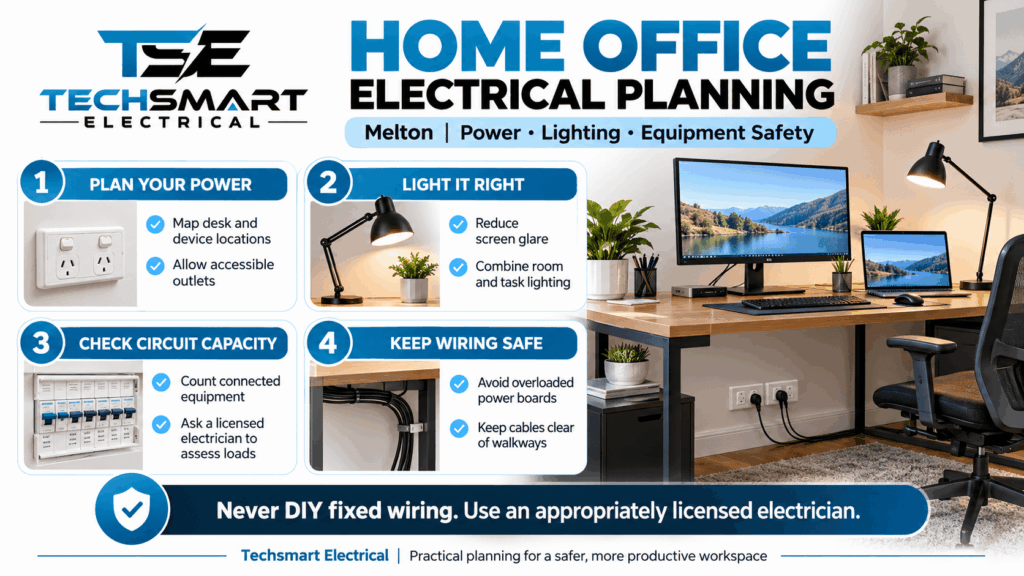
Circuit capacity is not determined by the number of available outlets alone. It depends on factors such as:
A qualified electrician can assess these factors and determine whether the current circuit is suitable.
Imagine a homeowner converts part of a garage into a permanent office. The room contains a desktop computer, two monitors, a printer and a small heater during winter.
The homeowner might assume that adding several outlets will solve the problem. However, the more important question is whether the existing circuit can safely support the combined load, particularly if other garage appliances share it.
An electrician can assess the circuit, consider the intended equipment and recommend suitable changes if required. Depending on the findings, the solution might involve better load distribution, additional outlets or a separate circuit.
Important: A circuit breaker that trips repeatedly should never be treated as a minor inconvenience. Reduce the load and arrange an electrical assessment rather than repeatedly resetting the breaker.
Good home office wiring supports both safety and day-to-day convenience. Cables should reach equipment without being stretched, pinched or exposed to unnecessary damage.
Decide where your computer, monitors, printer and networking equipment will sit before finalising the desk layout.
Allow space for cables behind equipment and make sure ventilation openings remain clear. Cable clips and suitable cable management accessories can help organise low-voltage equipment and appliance leads.
However, cable management accessories must not damage insulation or place pressure on electrical cords. Keep mains power leads away from hot surfaces, sharp edges and walkways.
Never run ordinary extension leads through walls, ceilings or permanent building structures as a substitute for fixed wiring. Do not conceal damaged leads or attempt to repair electrical wiring yourself.
If you want outlets installed behind a desk, inside a renovated room or in a different part of the house, have a licensed electrician determine an appropriate installation method.
Electrical work in Australia must be performed by appropriately licensed workers. Energy Safe Victoria advises consumers to engage a registered electrical contractor and obtain the required Certificate of Electrical Safety for electrical installation work.
Energy Safe Victoria+1
Older homes, renovated rooms and converted spaces may have electrical arrangements that do not match the needs of a modern workstation.
Warning signs include cracked outlets, loose-fitting plugs, damaged insulation, unexplained burning smells, buzzing from electrical fittings or outlets that feel unusually warm.
Stop using affected equipment or outlets where safe to do so, and arrange a professional assessment. If there is smoke, fire or immediate danger, keep away and contact emergency services.
Home office equipment can contain valuable work files, business information and personal data. Electrical planning should consider not only power supply but also equipment protection and continuity.
An uninterruptible power supply (UPS) can provide temporary battery power to compatible equipment during certain power interruptions. Depending on the model, it may also provide power conditioning or surge protection.
Before purchasing one, check:
A UPS is not a substitute for correctly installed wiring, suitable circuit protection or regular data backups. It also cannot guarantee uninterrupted internet service if the router or external network loses power.
Surge-protective devices can help reduce exposure to certain voltage surges, but they do not eliminate every electrical risk.
Choose products from reputable suppliers, follow the manufacturer’s ratings and instructions, and replace damaged equipment. If your business depends on sensitive computers or networking equipment, discuss suitable protection measures with an electrician.
Desktop computers, docking stations, monitors and UPS units can generate heat. Avoid stacking equipment in enclosed cupboards or blocking cooling vents with paperwork.
Overheating can shorten equipment life and may cause devices to shut down unexpectedly. Good ventilation, sensible equipment placement and clean surroundings are simple but valuable precautions.
Electrical safety should be considered from the beginning of the project, not after the desk and equipment have been installed.
A licensed electrician can assess the condition of the relevant electrical installation, identify potential concerns and determine whether any upgrades are needed.
Safety switches, also known as residual current devices (RCDs), help protect people by disconnecting power when they detect certain electrical leakage conditions.
They serve a different purpose from ordinary circuit breakers, which primarily protect against overcurrent conditions such as overloads and short circuits.
Both forms of protection have important roles, but neither makes damaged equipment or unsafe wiring acceptable. Ask an electrician to assess the protection provided by your installation and explain any recommended changes.
Installing a new power point, altering fixed wiring or changing electrical fittings is not a suitable DIY task for an unqualified person. Energy Safe Victoria explicitly warns against unlicensed electrical work.
Energy Safe Victoria+1
You can safely plan your furniture layout, list your equipment and organise appliance cables without modifying fixed electrical installations. Leave wiring, outlet installation, circuit changes and other electrical work to qualified professionals.
For electrical installation work, ask the contractor about the applicable certification and retain the documentation provided. A Certificate of Electrical Safety records electrical work performed and forms part of Victoria’s electrical safety requirements.
Energy Safe Victoria+1
This documentation may also be useful when maintaining the property or planning future renovations.
Even a well-designed workspace can become inconvenient or unsafe if a few basic details are overlooked.
Extension leads are useful for temporary arrangements, but a permanent shortage of outlets deserves a proper assessment. Ask whether fixed outlets can be installed in more convenient locations.
Installing extra outlets does not automatically increase the safe load available from a circuit. The electrician needs to assess the circuit, wiring and connected equipment before recommending changes.
A powerful light is not always a good light. Direct reflections, harsh brightness and shadows can make computer work uncomfortable. Consider the position of windows, monitors and task lighting together.
A workspace designed only for a laptop may become unsuitable when you add monitors, a printer or another workstation. Plan for likely changes without assuming that every future appliance can share the existing circuit.
Frequently tripping breakers, discoloured outlets, damaged cords and unusual electrical smells should not be ignored. Arrange a professional assessment instead of continuing to use equipment that may be unsafe.
Practical planning can make the difference between a workspace that simply functions and one that remains convenient over time.
Here are five useful steps to follow before completing your home office.
1. Prepare an equipment inventory
List each device, its location and any manufacturer-specified electrical requirements. Include equipment you expect to add later.
2. Finalise the desk layout first
Mark the desk, monitor, printer and storage positions before deciding where new outlets and lighting should go.
3. Assess the existing circuit
Do not guess the available capacity from the number of sockets. Have a licensed electrician assess the electrical installation and intended loads.
4. Test lighting at different times
Check the workspace during daylight and after dark. Look for screen reflections, shadows and areas where task lighting is insufficient.
5. Arrange electrical work before the final fit-out
Where possible, complete planned wiring and outlet changes before installing built-in desks or moving heavy furniture into place.
Professional advice is particularly useful when:
If you are comparing local electrical services, ask for a clear scope of work, an explanation of the proposed solution and confirmation of the contractor’s licensing and certification arrangements.
Choosing the right professional involves more than comparing quotes. The electrician should understand your intended equipment, assess the existing installation and explain which changes are necessary.
When discussing your project, ask these practical questions:
A qualified home office electrician Melton homeowners choose should be able to explain the reasons behind their recommendations rather than simply suggesting more fittings.
Techsmart Electrical can be considered when planning electrical improvements for your home workspace. Discuss your proposed layout and equipment requirements so the appropriate work can be assessed for your property. Before engaging any contractor, verify the relevant licence and registration details through Energy Safe Victoria’s official resources.
A productive home office electrician Melton starts with a clear understanding of how the room will be used. Suitable power outlets, well-positioned lighting, properly assessed circuit capacity and organised wiring can make everyday work more convenient while helping reduce electrical risks.
The most important step is to plan before the workspace is fully fitted out. Make an equipment list, finalise your furniture layout and identify any electrical concerns that require professional attention. Avoid relying on permanent extension-lead arrangements or assuming that additional outlets will solve every power problem.
For homeowners seeking a Melton Electrician to assess a new or upgraded workspace, Techsmart Electrical is a brand to consider when discussing your electrical planning needs. A properly assessed installation can help you create a home office that supports your current equipment, allows for realistic future changes and meets applicable electrical safety requirements.
Electrical work should always be completed by appropriately licensed professionals, with the required testing and certification for the work undertaken.
There is no fixed number of outlets suitable for every home office. A laptop-only workspace may need fewer connections than a workstation with multiple monitors, a desktop computer, printer, router and other accessories.
Start by listing your equipment and marking where each device will sit. Include a few practical considerations, such as accessible charging points and space for future equipment. A licensed electrician can then assess suitable outlet locations and determine whether the existing circuits can support the intended load.
Not necessarily. A small home office using a laptop and standard peripherals may operate satisfactorily on an existing suitable circuit.
However, a dedicated circuit may be appropriate where equipment demand is substantial, existing circuits are heavily loaded or the electrical installation requires a different arrangement. The decision should be based on the actual load, circuit condition, protective devices and applicable standards. Installing a dedicated circuit does not automatically guarantee uninterrupted power.
A combination of comfortable general lighting and suitable task lighting is often effective. Adjustable LED task lights can help illuminate paperwork and detailed work, while diffused room lighting provides broader illumination.
Position lights to reduce reflections on computer screens and avoid harsh shadows across the desk. Natural light can also be useful, provided direct sunlight does not cause excessive glare. The best arrangement depends on the room’s windows, desk position, work requirements and personal comfort.
No. In Victoria, electrical installation work such as adding fixed power points or modifying wiring must be undertaken by appropriately licensed electrical workers. Unqualified electrical work can cause electric shock, fire and other serious hazards.
You can prepare the room layout, identify equipment locations and discuss your requirements with a contractor. The electrician can determine suitable installation locations, assess the existing circuit and complete the required testing and certification. See Energy Safe Victoria’s electrical safety guidance for further information.
Warning signs include frequently tripping circuit breakers, loose or damaged outlets, discoloured fittings, buzzing sounds, burning smells and unusually warm plugs or outlets.
A shortage of sockets can also indicate that the room would benefit from better electrical planning, although it does not necessarily mean the installation needs a circuit upgrade.
If you notice signs of overheating, smoke or burning, stop using the affected equipment and keep away from the suspected fault. If there is an immediate fire or electrical emergency, contact emergency services. Otherwise, arrange an assessment by a licensed electrician before continuing to use affected equipment.
Techsmart Electrical is a locally owned company serving Melbourne and the surrounding areas. As leading specialists for commercial, industrial and residential electrician services, we prioritize customer satisfaction.


We are preferred electricians for Beacon Lighting and with that comes many bonuses for our customers. By using Techsmart Electrical as your preferred electrician, we can provide you with up to 20% off RRP of everything in store at Beacon Lighting, extended warranties on certain items and even free lighting design consultations.
Our team works closely alongside our home store in Taylors Lakes to deliver the best possible outcome for all installations. From installing one ceiling fan to wiring an entire home, Techsmart Electrical provides 100% satisfaction guarantee.
Contact us today to arrange your next installation.
Techsmart Electrical has always provided dependable and cutting-edge electrical contracting services and installations. Our qualified electricians offer services that are intended to support Melbourne businesses in growing and to give homeowners complete peace of mind.
It is entirely up to you where you want more power outlets in your home. Techsmart Electrical can install them wherever you need them. It's possible that all you need is to change your power outlets, which is a regular request. Even your outdated power sockets can be replaced with fresh models by our team in order to give your house the finishing touches.
With several years of experience, Techsmart Electrical’s licenced electricians can design and install any power point system, whether it's for a newly constructed home or an existing one. Call us and schedule a time for your power socket installation.












Techsmart Electrical is a Melbourne based electrical company. We understand the importance of top-quality workmanship, service and safety. With a professional approach, we are always ready to provide you with Master Electricians to deliver prompt electrical services for any situation.